Quick verdict: In this CapCut review, I’ve edited hundreds of videos in CapCut, from 15-second Reels to 20-minute YouTube uploads. The free plan is still the most generous in short-form video editing. But the 2026 pricing overhaul has changed the calculus, and not for the better.
I’ve been using CapCut since the early mobile-only days. My main setup now is the desktop app on a MacBook, with the mobile app for quick edits on the go. This review is based on real projects, real deadlines, and real moments of “why is this watermark here again?”
What CapCut Actually Does
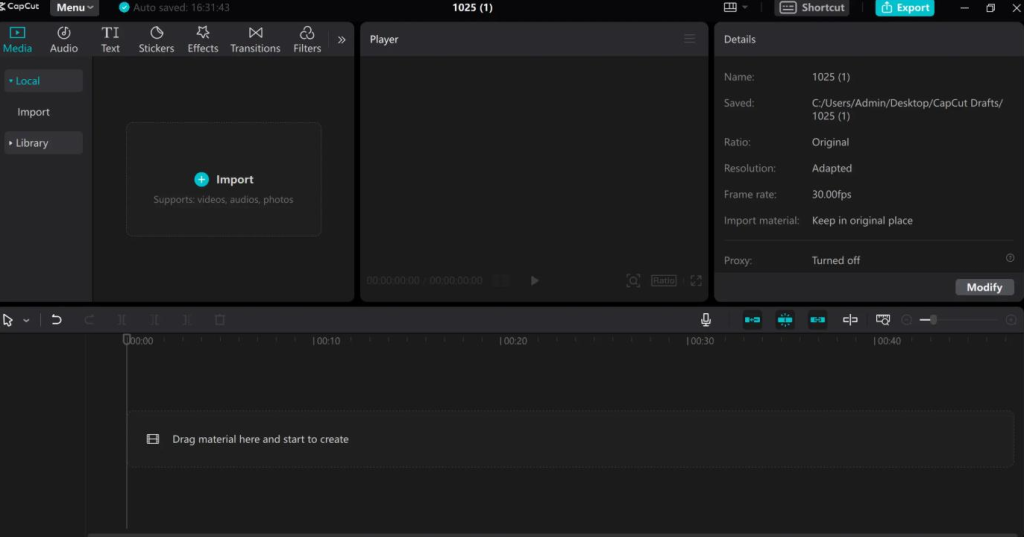
CapCut is a free, all-in-one video editor from ByteDance, the company behind TikTok. It runs on iOS, Android, Windows, and Mac, and it’s built for short-form content: TikToks, Reels, YouTube Shorts, and anything else that lives in vertical or square format.
The free plan includes cut, split, multi-track timeline, keyframe animation, chroma key, speed ramping, filters, music and sound effects, basic AI voiceover, and 1080p export. That’s not a stripped-down trial. That’s a genuinely capable editor.
Where CapCut has invested most heavily is AI. The desktop version now includes Script to Video (type an idea, get a script and a draft video), Auto Reframe (resizes video for different platforms without losing detail), Auto Cutout (background removal), and Remove Filler Words (auto-cuts “um,” “uh,” and pauses from podcast footage). In April 2026, CapCut also added an AI Assistant that lets you edit with natural language commands like “create a vlog” or “change background music.”
I tested the AI Assistant on a rough travel clip. It organized footage, matched pacing, and generated a draft with subtitles. Was it ready to publish? No. Was it a useful starting point? Absolutely.
Pros
As I continue this CapCut review, what I genuinely love:
- Auto-captions are the killer feature. CapCut made the animated word-by-word caption style mainstream, and it’s still the best free implementation I’ve used. Accuracy is strong in English, and I save at least an hour per week not captioning manually.
- The desktop app is shockingly good for free. Multi-track timeline, keyframes, green screen, speed ramping — the core editing workflow is solid. For 95% of social video creators, it does everything needed without getting in the way.
- Templates are a genuine time-saver. When a trending audio or format blows up, CapCut has a template for it within hours. For anyone posting daily, that speed matters.
- AI features that actually work. Background removal is comparable to paid tools for standard use cases. Image-to-video is more consistently useful than text-to-video for product shots and profile images. The AI Writer has saved me when I’m low on inspiration.
Cons
What frustrates me:
- The 2026 price hike is brutal. CapCut nearly doubled its annual Pro subscription from around $77 to $179.99 — a jump of over 100%. Users on older pricing faced a “renewal cliff” starting February 2026. I checked my own renewal and winced.
- Features that were free are now paywalled. Some 1080p export options, auto-generated captions, and templates that used to be free are now gated behind paid tiers. The watermark behavior changed too — Pro-tagged templates add a watermark unless you pay.
- The constant upselling is exhausting. Every time I open the app, there’s a new Pro prompt. It’s the most consistent complaint from long-term users.
- No real teleprompter. For talking-head creators, this is a real gap. CapCut offers no onboarding, coaching, or live assistance for troubleshooting either.
- Realistic human AI footage still looks uncanny. The AI video generation is good for abstract or stylized visuals, but for realistic human footage, it shows obvious artifacts — uncanny movement, inconsistent detail. Don’t expect to generate believable talking-head videos yet.
Pricing: Free vs. Paid Plans (2026)
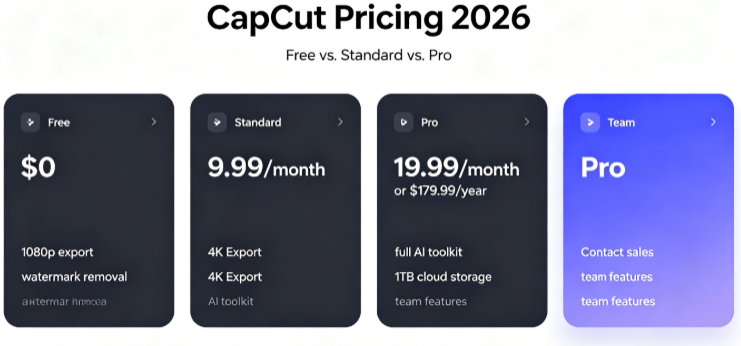
CapCut restructured its pricing in 2026. Here’s what you actually get:
表格
| Plan | Price | What You Get |
|---|---|---|
| Free | $0 | Full basic editing toolkit, 1080p export, free templates and effects, some AI features with limits |
| Standard | ~$9.99/month | Removes watermarks, unlocks additional templates/effects, mobile-focused, no 4K, no full AI suite |
| Pro | $19.99/month or $179.99/year | 4K export, full AI toolkit, 1TB cloud storage, 12M+ royalty-free assets, team features |
| Team | Contact sales | Built for collaboration |
Important: Direct purchase through the official CapCut website is typically 20–30% cheaper than buying through the App Store or Google Play. Users in Brazil and India see substantially lower prices than those in the US or Western Europe.
The Standard tier is mobile-only and monthly-only. If you want 4K export or the full AI toolkit, you have to go Pro.
Who Should Use CapCut
It’s a great fit if:
- You create short-form social video and need to publish fast
- You’re a beginner who wants a free editor with a real timeline and auto-captions
- You edit on mobile and want a capable desktop counterpart for bigger projects
- You don’t need professional NLE features like advanced audio mixing or color scopes
Skip it if:
- You need 4K export or the full AI suite and can’t justify $179.99/year
- You’re a professional editor needing multi-camera workflows and advanced color grading
- You’re uncomfortable with ByteDance’s data practices — that’s a legitimate concern for some creators
- You need a teleprompter or talking-head-specific workflow
Final Thoughts
Wrapping up this CapCut review: Wrapping up this CapCut review: After three years, CapCut is still the tool I open first when a trending audio drops and I need a video out the door in 20 minutes.The free plan remains unmatched for speed and accessibility. Auto-captions alone justify keeping it installed.
But I can’t pretend the 2026 changes didn’t sting. Doubling the Pro price while moving previously free features behind a paywall feels like a bait-and-switch, and the constant upselling has worn thin. I’m still on the free plan for most edits, and I export at 1080p like I always have.
If you’re a casual creator posting to social media, stick with free. If you need 4K and the AI toolkit, Pro is still cheaper than Premiere Pro — but “cheaper than Adobe” is a low bar. Go in with clear expectations: you’re getting a fast, capable social video editor with a monetization strategy that’s gotten noticeably more aggressive.
