
Quick verdict: I spent a month using free AI tools to teach my 8-year-old daughter cooking, money management, chores, and morning routines. No demo prompts. Only real kitchen messes, allowance arguments, and “I forgot my homework” mornings. Here’s what actually worked, what was just a gimmick, and which free tools I’d recommend to any mom in the USA.

Most articles about AI tools for teaching kids life skills are written by people who have never argued with an 8-year-old in the kitchen about why cookies can’t be dinner. They list apps, say “builds independence,” and move on.
I did it differently. I pre-tested every tool myself, then handed it to my daughter and watched how she actually used it, where she got stuck, and what she ignored. This review covers what holds up in 2026.
Direct Answer: The Best Free AI Tools for Teaching Kids Life Skills in 2026
| Tool | Account Needed? | Best For | Cost |
|---|---|---|---|
| ChatGPT Free | Email only | Visual schedules, chore charts, boredom menus | $0 |
| My First Nest Egg | Free app | Virtual wallet, allowance, saving decisions | $0 |
| earnt: Raise Capable Kids | Free app | Chore systems and capability scoring | $0 (7-day Pro trial) |
| Dots and Skills | Free app | Real-world tasks with AI feedback | $0 (free tier) |
These four AI tools cover the core of life skills: money, chores, routines, and hands-on tasks.
The #1 lesson: AI saves you time, it doesn’t replace you as the teacher. The most effective use is generating visual tools — chore charts, schedules, boredom menus — then printing them and sticking them on the fridge. Things on a screen get forgotten. Things on the fridge don’t.
ChatGPT Free was my first pick. I asked it to build a morning routine chart with pictures for my daughter, printed it, and taped it to her door. She packed her own backpack for the first time without being told.
6 Real Mom Use Cases I Tested
01 — A Morning Routine Chart With Pictures
Tool: ChatGPT Free · Time: 5 minutes · Account needed: Email
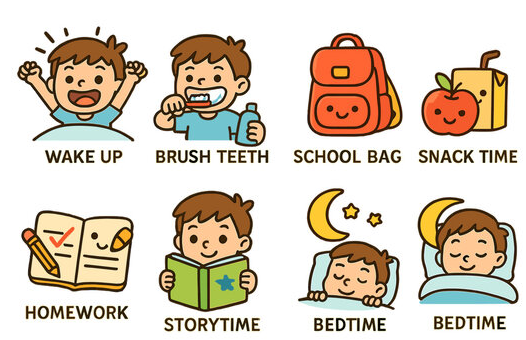
Every morning was a battle: find shoes, find homework, find water bottle. I asked ChatGPT to generate a visual routine chart with pictures, suitable for an 8-year-old.
What it produced: A step-by-step chart — wake up, get dressed, eat breakfast, brush teeth, pack backpack, put on shoes — with simple icons and a checkbox for each step. I printed it and taped it to her door.
What happened: The first week, she checked it herself every morning. I stopped saying “go pack your backpack.” It’s not magic, but it moved the responsibility from my mouth to a piece of paper.
02 — A Chore Chart She Actually Uses
Tool: ChatGPT Free · Time: 4 minutes · Account needed: Email
My daughter had zero interest in “doing chores,” but she loves checking boxes. I asked ChatGPT to build a visual chore chart with only age-appropriate tasks.
What it produced: A chart with checkboxes for: make bed, put dirty clothes in hamper, feed the dog, set the table, wipe the table. Each had a small icon.
What I noticed: The value wasn’t the task list. It was that she could check it herself. That gave her a sense of control instead of feeling ordered around.
03 — Teaching “Want” vs. “Need”
Tool: My First Nest Egg · Time: 10 minutes setup · Account needed: Free app
This app was designed to teach kids ages 3+ about money. It uses three virtual accounts: Save, Spend, Give.
My daughter’s reaction: For the first time, she had to decide: buy the sticker book now from Spend, or keep saving for something bigger. She chose to keep saving.
Why it worked: It turned “delayed gratification” into a decision she made, not a “no” from me. The app also has a puzzle system — each savings milestone adds a piece, making the wait visible.
04 — A “Boredom Menu” Instead of “That’s Not My Problem”
Tool: ChatGPT Free · Time: 3 minutes · Account needed: Email
On a summer afternoon, my daughter said “I’m bored” for the hundredth time. I asked ChatGPT to build a boredom menu.
What it produced: A chart listing 10 activities she could do herself — read, draw, build with LEGO, hunt for bugs in the backyard, make a card for grandma, organize one shelf of her bookshelf.
What happened: She taped it next to her desk. I noticed she actually looked at it and picked something. Not because the activities were more fun than my suggestions — because she chose them herself.
05 — Teaching That Chores and Earning Are Different
Tool: earnt: Raise Capable Kids · Time: 15 minutes setup · Account needed: Free app (7-day Pro trial)
What I love about this app’s concept: it separates Family Jobs (you do them because you’re part of the family) from Paid Jobs (extra work you can earn from).
How we used it: Cleaning her own room and feeding the dog = Family Jobs, no money. Helping wash the car or organizing garage shelves = Paid Jobs, allowance eligible.
My daughter’s reaction: She started asking “are there any Paid Jobs I can do?” That worked far better than “I’ll give you $5 to sweep the floor,” because she was choosing how much to earn.
Note: Free download, Pro is $49/year after a 7-day trial. The free tier covers basic features.
06 — Real Hands-On Tasks, Not Screen Tasks
Tool: Dots and Skills · Time: 10 minutes/day · Account needed: Free app
This was my favorite discovery. Dots and Skills gives one “Dot” per day — a real-world mini task. The child completes it, uploads a photo or voice note, and AI gives instant feedback.
The task my daughter received: “Teach someone in your family something you can do that they can’t.” She taught me how to animate in her drawing app.
Why the design works: It doesn’t let kids “learn” life skills on a screen. It sends them away from the screen to do it, then come back and upload proof. The AI feedback is instant, gentle, and safe.
Limitation: One task per day on the free tier. But one a day is 365 a year.
Complete Free Mom Life-Skills AI Tools Comparison
| Tool | Account Required? | Cost | Best Life Skill | Confusion Level | Verdict |
|---|---|---|---|---|---|
| ChatGPT Free | Email only | $0 | Schedules, chore charts, boredom menus | Low | Start here |
| My First Nest Egg | Free app | $0 | Allowance, saving, spending decisions | Very low | Best for money |
| earnt | Free app | $0 (Pro trial) | Chore systems, capability building | Low | Best for chores |
| Dots and Skills | Free app | $0 (free tier) | Real-world tasks, daily habits | Very low | Best for hands-on |
Setup Guide for Moms
Print first, download second. ChatGPT-generated schedules, chore charts, and boredom menus only work if they’re printed and stuck on the fridge. Things on a screen get forgotten.
Start with My First Nest Egg for money. No bank info needed — just a name and email. The three accounts (Save/Spend/Give) are the simplest way to teach decisions.
Use earnt to separate “should do” from “can earn.” That distinction is itself a lesson. Kids need to know that as family members, some things are responsibilities, not transactions.
One Dots and Skills task per day. Don’t overload. One real task a day is 365 a year.
Look at these together, don’t look for her. The biggest value of these tools is creating conversation, not replacing it. She does the task, you ask “how did that feel,” then look at what the AI said together.
Print a cheat sheet: each tool, its purpose, and the reminder: “AI generates the tool. You make the connection.”
Final Thoughts
All four tools I tested have free tiers you can start at zero cost. For moms who want to teach life skills but don’t have time to design a curriculum, these tools help you generate the tools — charts, tables, tasks — but the teaching is still yours.
One last note: the most useful feature is often the most boring one. A morning routine chart with pictures worked better than any fancy AI tutorial I tried. Because kids don’t remember what you said — but the thing taped to the fridge, they see every day.
Disclaimer: AI tools provide general information only and cannot replace professional educational or psychological advice. Every child develops at their own pace — adjust according to your child’s actual needs.
Author Note:I tested these tools over one month in September 2026 with my 8-year-old daughter. No sponsorship, no affiliate relationship with any tool mentioned. Pricing and free-tier limits were verified at the time of writing — check each official site for current terms.
Published October 2026.
