Quick verdict: I spent a full week testing Otter.ai on real sales team meeting recordings. It is one of the best free AI transcription tools for quick meeting note-taking, with reliable speaker detection and handy multi-format exports. That said, it struggles with heavy Irish or regional accents, and the free tier has strict monthly transcription limits. It’s great for small remote teams, freelancers, and podcasters — but not the best pick if you regularly work with strong accents or very long meetings.

Most articles about AI tools for college students are written by people who have never pulled an all-nighter before a midterm or stared at a blank essay draft at 2 AM. They list tools, say “great for studying,” and move on.
I did it differently. I pre-tested every tool, then used it on real coursework with real deadlines. This review covers what holds up in 2026 — and what will get you flagged.
Direct Answer: The Best Free AI Tools for College Students in 2026
| Tool | Account Needed? | Best For | Cost |
|---|---|---|---|
| ChatGPT Free | Email only | Essay outlining, concept explanations | $0 |
| NotebookLM | Google account | Studying your own lecture notes and PDFs | $0 |
| Quizlet Free | Email only | Flashcards and practice tests | $0 |
| Otter.ai Free | Email only | Lecture transcription | $0 (limited minutes) |
These four cover the core student workflow: understand, organize, memorize, review.
The #1 lesson: AI is a study aid, not a submission tool. Schools in the USA have wildly different AI policies — some allow it with disclosure, some ban it entirely. Before you use AI on any assignment, check your syllabus. I nearly submitted an AI-polished paragraph that my professor’s policy would have flagged as a violation.
NotebookLM was my first pick. It only answers from the sources you upload, which means far less hallucination than general chatbots.
6 Real College Use Cases I Tested
01 — Turning Lecture Recordings Into Study Notes
Tool: Otter.ai Free · Time: 6 minutes · Account needed: Email
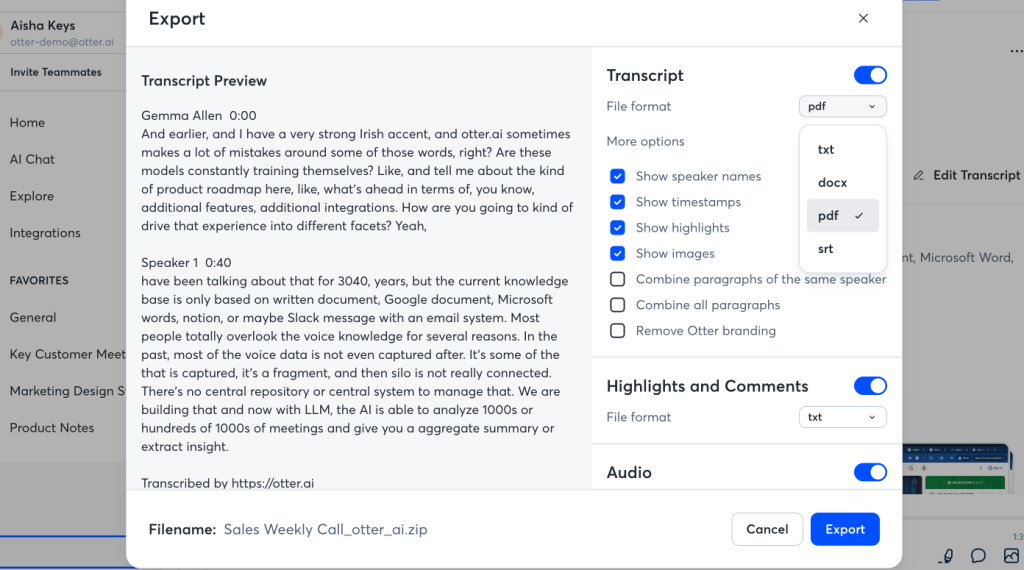
I recorded a 50-minute lecture and uploaded it to Otter. It transcribed the audio and generated a summary with key points.
What worked: The transcription was accurate enough to study from. It caught the professor’s repeated emphasis on three concepts, which became my review priorities.
What I noticed: The free tier has a monthly minute limit. For a full course load, you’ll hit it fast. Also, always ask your professor before recording a lecture — policies vary by school.
02 — Studying From Your Own Notes Without Hallucination
Tool: NotebookLM · Time: 8 minutes · Account needed: Google
This was the most useful discovery. NotebookLM lets you upload your own PDFs, lecture slides, and notes, then asks questions only from those sources.
What worked: I uploaded three weeks of lecture slides and asked it to explain a concept I’d missed. It pulled the answer directly from my own material, with citations back to the specific slide.
Why this matters: General chatbots will confidently make things up. NotebookLM is grounded in your sources, which makes it far safer for exam prep. This is the tool I’d recommend to any student who wants AI help without the hallucination risk.
03 — Outlining an Essay Before Writing It
Tool: ChatGPT Free · Time: 5 minutes · Account needed: Email
I had a 2,000-word essay due and no idea where to start. I pasted the prompt into ChatGPT and asked for three possible argument structures.
What worked: It gave me three distinct angles with supporting points for each. I picked one and built my own outline from it.
What I had to watch: I used it for structure, not for sentences. If you paste AI-written paragraphs into an essay, you risk both plagiarism flags and losing your own voice. My rule: AI for the skeleton, me for the muscle.
04 — Flashcards and Practice Tests
Tool: Quizlet Free · Time: 10 minutes · Account needed: Email
I pasted my lecture notes into Quizlet’s AI flashcard generator and got a 30-card deck in seconds. Then I used the practice test mode to quiz myself.
What worked: The AI-generated cards were surprisingly accurate on definitions and terms. The practice test mode helped me find gaps before the real exam.
What I noticed: Some cards were too vague and needed rewriting. Treat AI-generated cards as a first draft, not a final study set.
05 — Explaining Hard Concepts in Plain Language
Tool: ChatGPT Free · Time: 4 minutes · Account needed: Email
I was stuck on a statistics concept and my textbook explanation wasn’t clicking. I asked ChatGPT to explain it three different ways: like I’m 12, with a real-world analogy, and step by step.
What worked: The analogy version finally made it click. That’s something a textbook can’t do — it gives you one explanation and moves on.
What I had to watch: AI explanations can be subtly wrong in technical subjects. I cross-checked the concept against my textbook before trusting it.
06 — Polishing Grammar Without Losing My Voice
Tool: ChatGPT Free · Time: 5 minutes · Account needed: Email
I wrote a draft, then asked ChatGPT to fix grammar and awkward phrasing — with one strict rule: do not change my tone or rewrite sentences.
What worked: It caught comma errors, a run-on, and two awkward constructions. The rest stayed mine.
What I had to watch: This is the highest-risk use case for academic honesty. Many schools classify AI grammar editing differently — some allow it, some consider it AI-assisted writing that must be disclosed. Check your policy before doing this on any graded assignment.
Complete Free College Student AI Tools Comparison
| Tool | Account Required? | Cost | Best Use Case | Confusion Level | Verdict |
|---|---|---|---|---|---|
| ChatGPT Free | Email only | $0 | Essay outlining, concept explanations | Low | Best overall |
| NotebookLM | Google account | $0 | Studying your own notes and PDFs | Very low | Safest for exam prep |
| Quizlet Free | Email only | $0 | Flashcards and practice tests | Very low | Best for memorization |
| Otter.ai Free | Email only | $0 (limited) | Lecture transcription | Low | Best for lectures |
Where AI Gets Students in Trouble
This section matters more than the tool list.
Fully AI-written essays get flagged. Detection tools aren’t perfect, but professors are also just getting better at spotting writing that doesn’t match your voice. A fully AI-written paragraph in a 2,000-word essay stands out.
AI grammar editing policies vary. Some schools allow it. Some require disclosure. Some consider it a violation. Check your syllabus before you touch a graded assignment.
AI hallucinates in technical subjects. Math, science, and statistics explanations can be subtly wrong. Always cross-check against your textbook or lecture notes.
Lecture recording requires consent. Many professors and schools have policies about recording. Ask first.
Group work is a gray area. If your group project policy doesn’t mention AI, ask before using it.
Setup Guide for College Students
Check your syllabus first. Before downloading anything, find out what your school and each professor allows. This takes five minutes and can save your semester.
Start with NotebookLM for exam prep. Upload your own notes and PDFs. It’s the safest AI tool for studying because it only answers from your sources.
Use ChatGPT for outlining, not writing. Let it help you structure your argument. Write the actual sentences yourself.
Set up Quizlet for memorization-heavy courses. Generate cards from your notes, then edit them.
Try Otter.ai for lectures — after asking your professor. Watch the monthly minute limit.
Keep a rule for yourself: AI for understanding and organizing. You for writing and submitting.
Final Thoughts
All four tools I tested have free tiers you can start at zero cost. For college students handling lecture notes, exam prep, essay structure, and memorization, these tools genuinely help — but only if you use them as study aids, not submission shortcuts.
One last note: the students who benefit most from AI are the ones who use it to understand faster, not to write faster. AI can explain a concept three ways, organize your notes, and quiz you before an exam. It cannot sit your exam for you — and it shouldn’t write your essay for you either.
Disclaimer: AI tools provide general information only. Academic integrity policies vary by school and by professor — always check your syllabus and ask before using AI on graded work.
Author Note: I tested these tools over two weeks in September 2026 on real college coursework. No sponsorship, no affiliate relationship with any tool mentioned. Pricing and free-tier limits were verified at the time of writing — check each official site for current terms, as they vary by region and promotion.
Published October 2026.
